Accueil / Entreprise / Linkedin / Double authentification pour votre LinkedIn

Double authentification pour votre LinkedIn

Vos identifiants de connexion LinkedIn piratés par phishing, malveillance locale, piratage de l’entreprise ? Pas de panique, le pirate ne pourra rien faire si vous avez installé la double authentification. Mode d’emploi.

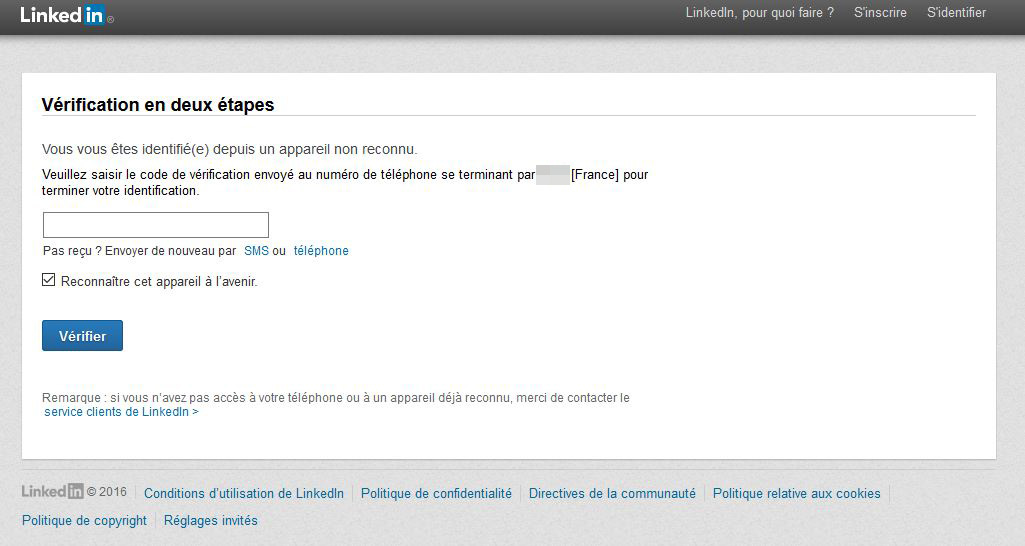
Comme vous avez pu le lire plus d’une fois, une base de données volée par un pirate comprend, très souvent, login et mots de passe. Même si le password est chiffré, cela ne veut pas dire que ce dernier ne sera pas « crackable » aujourd’hui, via des outils libres et rapides d’accès. Ou demain, via des techniques non encore connues/découvertes. Si vous utilisez le service professionnel LinkedIn, il est possible d’utiliser la double authentification. Je vous conseille fortement de le faire. Pour cela, il vous est demandé de fournir votre numéro de téléphone. Ce dernier servira à recevoir un SMS avec un code de validation. Bilan, quand vous rentrez votre login et mot de passe sur LinkedIn, votre téléphone portable vous servira de seconde clé via ce texto.
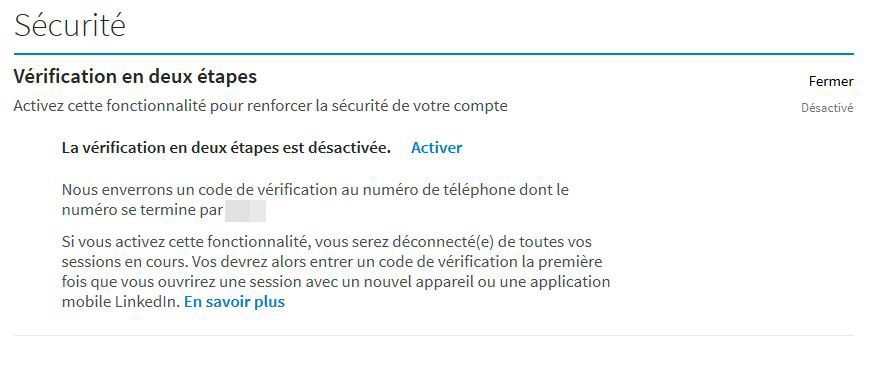
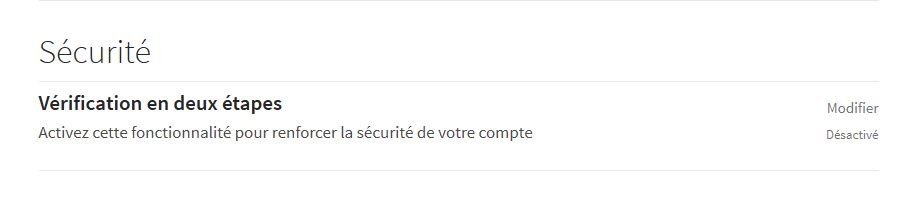
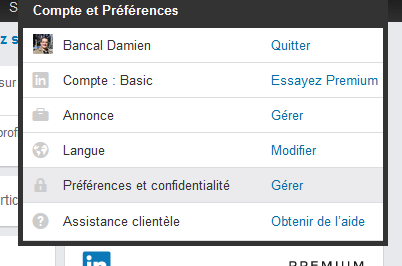
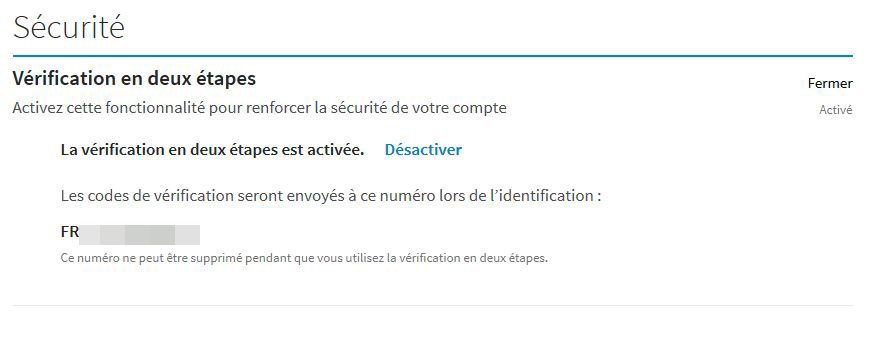
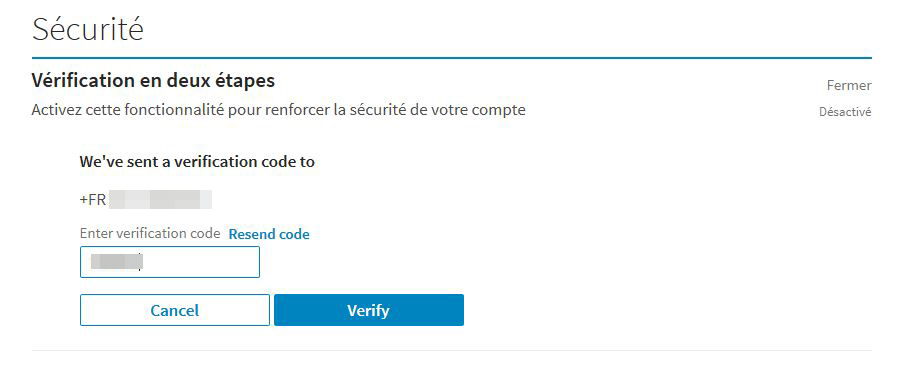
Pour activer la vérification en deux étapes : Placez votre souris sur votre photo de profil en haut à droite de votre page d’accueil et sélectionnez « Préférences et confidentialité« . Cliquez sur l’onglet « Confidentialité« , icône du milieu, en haut de la page. Faites défiler jusqu’à la section Sécurité. Cliquez sur Vérification en deux étapes. Cliquez sur Activer pour modifier le statut de la vérification en deux étapes. Vous allez recevoir un code par SMS qui permettra de valider votre numéro de téléphone.

Même possibilité pour Yahoo! Dailymotion ou encore Microsoft.

Étiquetté :

Un commentaire

  • Et du coup on donne notre n° de tél aux pirates. Ils en tireront plus d’argent. Cruel dilemme

Nos partenaires


Actualités du mois

mars 2026
L M M J V S D
 1
2345678
9101112131415
16171819202122
23242526272829
3031  

Articles en UNE

Actus zataz


Réseaux sociaux


Liste des sujets


<!-- Cyber'Émission ZATAZ — badge volant (déplaçable) + réduire/fermer -->
<div class="zataz-yt-float" id="zatazYtFloat" role="region" aria-label="Cyber'Émission ZATAZ">
  <div class="zataz-yt-float__bar" id="zatazYtBar">
    <span class="zataz-yt-float__title">Cyber'Émission ZATAZ</span>

    <div class="zataz-yt-float__actions">
      <button type="button" class="zataz-yt-float__btn" id="zatazYtMin" aria-label="Réduire">—</button>
      <button type="button" class="zataz-yt-float__btn zataz-yt-float__btn--close" id="zatazYtClose" aria-label="Fermer">×</button>
    </div>
  </div>

  <a class="zataz-yt-badge" href="https://www.youtube.com/@ZATAZCOM" target="_blank" rel="noopener noreferrer"
     aria-label="Regarder Cyber'Émission ZATAZ sur YouTube (nouvel onglet)">
    <span class="zataz-yt-badge__thumb" aria-hidden="true">
      <span class="zataz-yt-badge__play" aria-hidden="true"></span>
    </span>
  </a>
</div>

<style>
  .zataz-yt-float{
    position:fixed;
    right:18px;
    bottom:18px;
    z-index:99999;
    width:320px;
    max-width:calc(100vw - 36px);
    border-radius:14px;
    overflow:hidden;
    background:linear-gradient(135deg,#111827,#0b1220 55%,#111827);
    border:1px solid rgba(255,255,255,.12);
    box-shadow:0 14px 40px rgba(0,0,0,.35);
    transform:translateZ(0);
    user-select:none;
    touch-action:none; /* drag mobile */
  }

  /* Barre de drag + boutons */
  .zataz-yt-float__bar{
    display:flex;
    align-items:center;
    justify-content:space-between;
    gap:10px;
    padding:10px 10px 10px 12px;
    font-family:system-ui,-apple-system,Segoe UI,Roboto,Arial,sans-serif;
    color:#fff;
    background:rgba(0,0,0,.18);
    border-bottom:1px solid rgba(255,255,255,.10);
    cursor:grab;
  }
  .zataz-yt-float__bar:active{ cursor:grabbing; }
  .zataz-yt-float__title{
    font-weight:800;
    letter-spacing:.2px;
    font-size:15px;
    line-height:1;
    white-space:nowrap;
    overflow:hidden;
    text-overflow:ellipsis;
  }
  .zataz-yt-float__actions{ display:flex; gap:8px; }
  .zataz-yt-float__btn{
    appearance:none;
    border:1px solid rgba(255,255,255,.18);
    background:rgba(0,0,0,.28);
    color:#fff;
    width:32px;
    height:28px;
    border-radius:10px;
    font-weight:900;
    line-height:1;
    cursor:pointer;
    display:grid;
    place-items:center;
  }
  .zataz-yt-float__btn:hover{ background:rgba(255,255,255,.08); border-color:rgba(255,255,255,.28); }
  .zataz-yt-float__btn--close:hover{ background:rgba(239,68,68,.22); border-color:rgba(239,68,68,.45); }

  /* Contenu (votre vignette) */
  .zataz-yt-badge{
    display:block;
    text-decoration:none;
    color:#fff;
  }
  .zataz-yt-badge__thumb{
    display:block;
    height:180px;
    background:#0f172a url("https://i.ytimg.com/vi/HUo8dnD6Swk/hqdefault.jpg") center/cover no-repeat;
    position:relative;
  }
  .zataz-yt-badge__play{
    position:absolute;
    left:50%;
    top:50%;
    width:54px;
    height:54px;
    margin:-27px 0 0 -27px;
    border-radius:999px;
    background:rgba(0,0,0,.55);
    border:1px solid rgba(255,255,255,.25);
    box-shadow:0 10px 22px rgba(0,0,0,.35);
  }
  .zataz-yt-badge__play:before{
    content:"";
    position:absolute;
    left:22px;
    top:16px;
    width:0;height:0;
    border-top:11px solid transparent;
    border-bottom:11px solid transparent;
    border-left:16px solid #fff;
  }

  .zataz-yt-float:hover{
    box-shadow:0 18px 55px rgba(0,0,0,.45);
    border-color:rgba(255,255,255,.18);
  }
  .zataz-yt-badge:active{ transform:scale(.99); }

  /* Etat réduit */
  .zataz-yt-float.is-min .zataz-yt-badge{ display:none; }
  .zataz-yt-float.is-min{ width:260px; }

  /* Mobile : plus compact */
  @media (max-width:480px){
    .zataz-yt-float{ width:280px; right:12px; bottom:12px; }
    .zataz-yt-badge__thumb{ height:158px; }
    .zataz-yt-float.is-min{ width:220px; }
  }
</style>

<script>
(() => {
  const box = document.getElementById('zatazYtFloat');
  const bar = document.getElementById('zatazYtBar');
  const btnMin = document.getElementById('zatazYtMin');
  const btnClose = document.getElementById('zatazYtClose');

  if (!box || !bar || !btnMin || !btnClose) return;

  // Réduire / restaurer
  btnMin.addEventListener('click', (e) => {
    e.stopPropagation();
    box.classList.toggle('is-min');
    btnMin.textContent = box.classList.contains('is-min') ? '▢' : '—';
    btnMin.setAttribute('aria-label', box.classList.contains('is-min') ? 'Restaurer' : 'Réduire');
  });

  // Fermer
  btnClose.addEventListener('click', (e) => {
    e.stopPropagation();
    box.remove();
  });

  // Drag (souris + tactile) via Pointer Events
  let dragging = false;
  let startX = 0, startY = 0;
  let startLeft = 0, startTop = 0;

  // Position initiale: on convertit right/bottom en left/top pour le drag
  const init = () => {
    const r = box.getBoundingClientRect();
    box.style.left = r.left + 'px';
    box.style.top  = r.top  + 'px';
    box.style.right = 'auto';
    box.style.bottom = 'auto';
  };
  init();

  const clamp = (v, min, max) => Math.min(Math.max(v, min), max);

  bar.addEventListener('pointerdown', (e) => {
    // pas de drag quand on clique sur les boutons
    if (e.target === btnMin || e.target === btnClose) return;

    dragging = true;
    bar.setPointerCapture(e.pointerId);

    const r = box.getBoundingClientRect();
    startX = e.clientX;
    startY = e.clientY;
    startLeft = r.left;
    startTop = r.top;

    e.preventDefault();
  });

  bar.addEventListener('pointermove', (e) => {
    if (!dragging) return;

    const dx = e.clientX - startX;
    const dy = e.clientY - startY;

    const r = box.getBoundingClientRect();
    const w = r.width;
    const h = r.height;

    const maxLeft = window.innerWidth - w - 8;
    const maxTop  = window.innerHeight - h - 8;

    box.style.left = clamp(startLeft + dx, 8, maxLeft) + 'px';
    box.style.top  = clamp(startTop + dy, 8, maxTop) + 'px';
  });

  const endDrag = () => { dragging = false; };
  bar.addEventListener('pointerup', endDrag);
  bar.addEventListener('pointercancel', endDrag);

  // Re-clamp au resize
  window.addEventListener('resize', () => {
    const r = box.getBoundingClientRect();
    const maxLeft = window.innerWidth - r.width - 8;
    const maxTop  = window.innerHeight - r.height - 8;
    box.style.left = clamp(r.left, 8, maxLeft) + 'px';
    box.style.top  = clamp(r.top, 8, maxTop) + 'px';
  });
})();
</script>